WMC help
MUD scripting: triggers, aliases, timers and macros
The client can react to a world for you: send a command when a line arrives, expand a short command into a long one, repeat something on a timer, or draw your own gauges and panels. This page covers the macro forms (no code needed), JavaScript scripts, script packs from the directory, and the limits that keep automation safe.
Before you automate anything, check the world's rules. Many MUDs limit or forbid automated play.
Where scripts and macros live
Scripts and macros are saved per world, alongside its connection and login settings. To open them:
- Right-click a saved world and choose Edit…, or, in an open session, choose Session > Scripts….
- In the section list on the left, pick Scripts or Macros.
- Make your changes, then choose Save world (Cmd+S on macOS, Ctrl+S on Windows and Linux).
Everything you change stays a draft until you save. Cancel asks before throwing away pending changes.
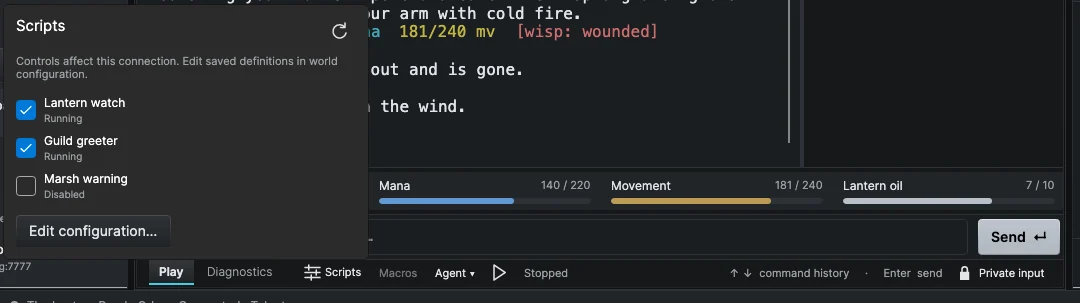
Saving does not change a connection that is already open. In the session footer, open the Scripts menu and choose Reload saved rules to load your saved changes into that connection. The same menu has an on/off switch for each loaded script (this affects only that connection) and Edit configuration… to jump back to the editor. The Macros toggle next to it turns this session's enabled macros on or off without changing their saved settings.
Macros: automation without code
The Macros section offers four kinds of rule under When to run:
| Type | Runs when |
|---|---|
| Text received | A complete line from the world Contains, Starts with or Equals your text. |
| Command alias | The whole command you type equals the alias. The macro's commands are sent instead. |
| Repeating timer | Every interval you set, from 1 second to 86,400 seconds (24 hours), while connected. |
| Keyboard shortcut | You press a function key, F1 to F12, while the Play command input has focus. Some keyboards need Fn. |
A trigger is a rule that watches the text the world sends and acts when a line matches. An alias is a short command you type that the client replaces before sending.
To make a macro:
- Choose Add macro, give it a name and pick When to run.
- Fill in Text to match, the interval or the function key. Turn on Ignore capitalization if you want.
- Under Send commands, enter one command per line, up to 20. They are sent in order.
- Turn on Enabled, then Save world, then reload the session's rules.
Macro text is matched literally. For patterns and captured words, use a script.
Scripts in JavaScript
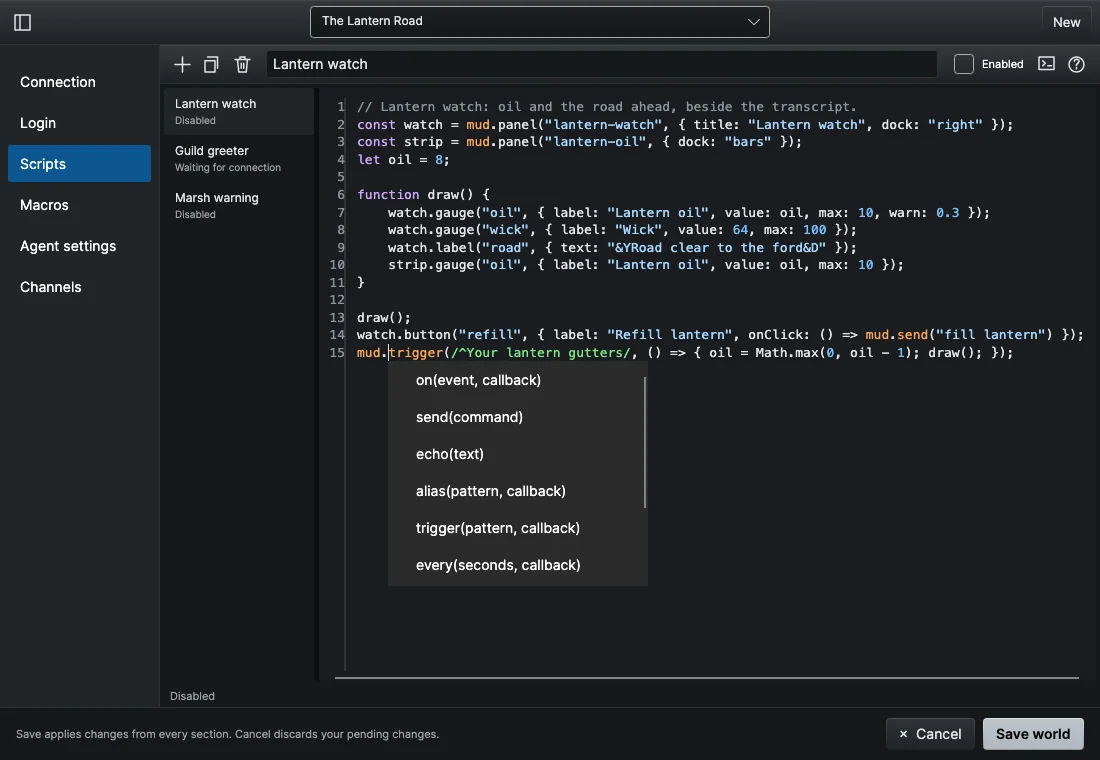
In the Scripts section, choose New, name the script and write its source. JavaScript is built in, so you do not need to install Node.js or anything else. Type mud. or Events. for suggestions, or press Ctrl+Space. New scripts start disabled.
Everything a script can do goes through the mud object. This script adds an alias, a trigger and a timer:
// Alias: typing "gr Anna" sends "say Hello, Anna!"
mud.alias(/^gr (.+)$/, match => mud.send("say Hello, " + match[1] + "!"));

// Trigger: runs for every complete line that matches.
mud.trigger(/^You are hungry\.$/, () => mud.send("eat bread"));

// Timer: every 300 seconds (minimum 1).
mud.every(300, () => mud.echo("Five minutes have passed."));
match[1] is the first group in parentheses. Only the first matching alias handles a command, while every matching trigger runs. mud.send sends one command to the world (it skips your aliases), and mud.echo prints a line in your own transcript without sending it. Callbacks must be synchronous.
Reading GMCP and MSDP values
Many worlds send structured data alongside the text: GMCP (JSON messages such as Char.Vitals) and MSDP (named variables such as HEALTH). A script can listen for them with mud.on(Events.Gmcp, ...) and mud.on(Events.Msdp, ...), or read the latest value at any time with mud.state.get. The client keeps the values received since you connected, so a script that starts later can still read them.
Panels and gauges
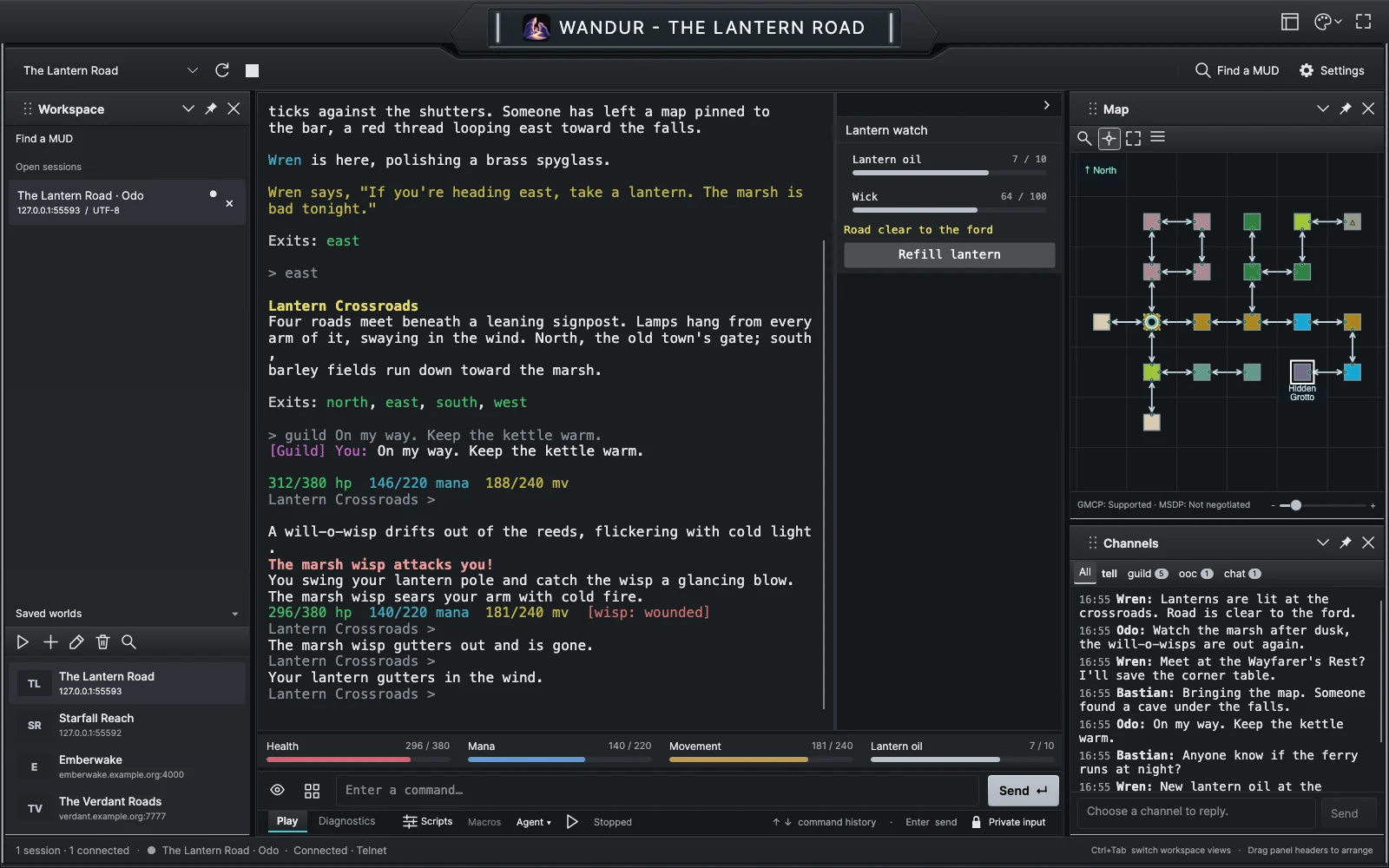
A script can draw its own panel beside the transcript, with gauges, labels, lists, tables, buttons, check boxes and text boxes. With dock: "bars", its gauges join the vitals strip under the transcript instead.
This example shows a health bar from GMCP. Field names vary between worlds (hp and maxhp are common), so open the session's Diagnostics tab to see what your world actually sends.
const bars = mud.panel("mybars", { dock: "bars" });

function refresh() {
    const hp = Number(mud.state.get("gmcp.Char.Vitals.hp"));
    const max = Number(mud.state.get("gmcp.Char.Vitals.maxhp"));
    if (Number.isFinite(hp) && max > 0) {
        bars.gauge("hp", { label: "Health", value: hp, max: max, warn: 0.25 });
    }
}

mud.on(Events.Gmcp, event => {
    if (event.package === "Char.Vitals") refresh();
});
refresh(); // show the current value right away
The bar turns to the warning color at or below 25 percent of the maximum. Panels disappear when their script stops or the session closes.
Script packs
Some worlds in the directory supply scripts. When you open such a world, they are added to its library marked Pack, with a note saying whether they were Generated or Reviewed. Pack scripts are read-only and start enabled. Choose Duplicate to make your own editable copy.
A pack script may send commands only from an alias or a panel button until you turn on Allow this script to send commands for it. Read a pack script before you allow it: "reviewed" describes how it was made, not a promise that it is safe for your character.
Limits
- Private input pauses automation. While Private Input is on (and during automatic login), scripts and macros receive nothing and send nothing, and saved passwords are never passed to scripts.
- Runaway scripts are stopped. Each callback may run for 300 milliseconds and 100,000 statements. A script that breaks a limit is stopped with an error, and other scripts keep running.
- Sending is rate limited. All scripts in a session share a limit of 20 commands per second and 200 per minute. A script that goes over is stopped.
- Size. Up to 64 scripts and macros per world, and 256 KB of source per script.
- No outside access. Scripts cannot read files, use the network or reach anything outside the client.
Run only scripts you have read and trust. The isolation reduces accidents, but it is not a security sandbox for hostile code.
Full reference
Every function, event, widget and limit is listed in the scripting reference on GitHub.