WMC help
Search your MUD session history and logs
The client keeps a local, searchable record of your sessions, so you can find what a character said three nights ago or reread how a quest went. This page explains what is recorded, how to search it, what is never recorded, and how to turn recording off or delete what is there.
What the client records
While recording is on, each connection becomes a history session. For every line it keeps:
- the plain text, without colors or formatting,
- the time,
- whether it was Received from the world, Sent by you, or written by a Script,
- the world and the character.
Raw network data and protocol data (GMCP and MSDP) are not stored. A line is saved once it is complete, so a half-finished line is held until the world finishes it or you disconnect. Each time you reconnect, a new history session starts.
Recording is on by default and keeps entries for 30 days. When a connection starts recording, a short notice says that history is saved on this device. Check Don't show again to stop showing that notice; this does not turn recording off.
Opening and searching history
Choose View > Session history. It opens in its own window, so you can keep playing while you read. Nothing in this window sends anything to a world.
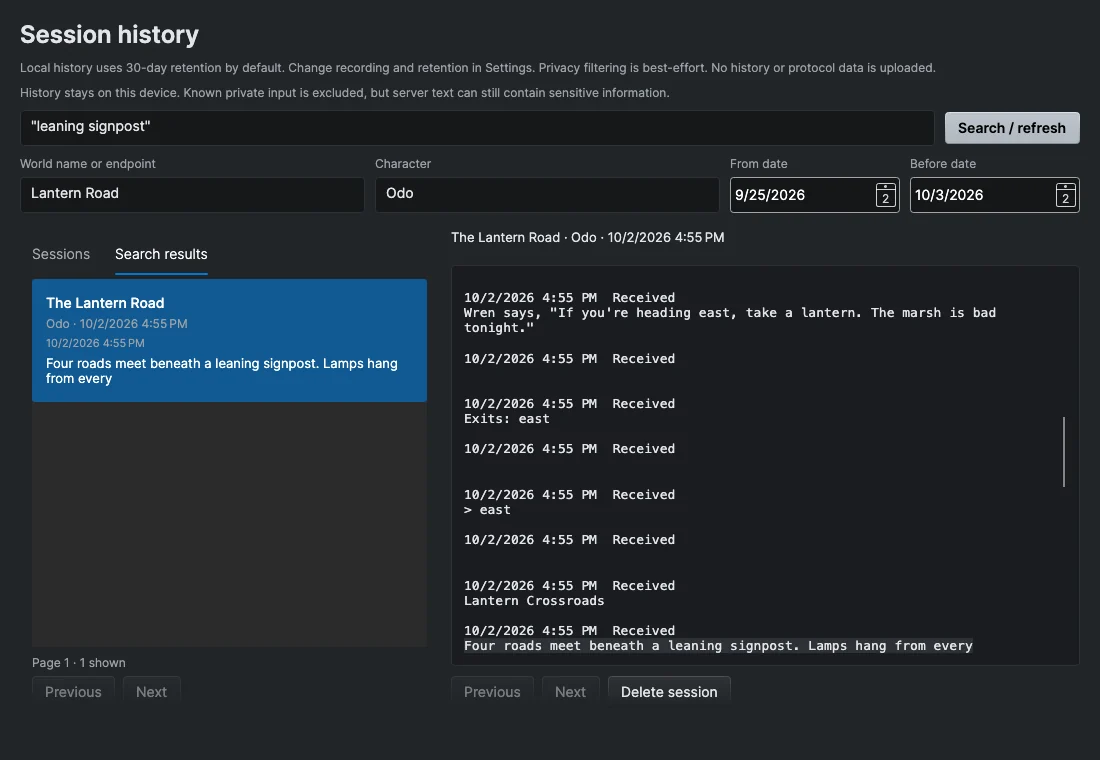
To search:
- Type words in the search box. Use double quotes for an exact phrase, for example
"the old lighthouse". - Add filters if you need them (see below).
- Choose Search / refresh.
- Open the Search results tab and select a result. Its surrounding transcript opens with the matching line selected, and Previous and Next page through the context.
All words must appear in the same line. Words such as OR and NOT, and wildcard characters, are searched as ordinary text. Results are listed newest first, 50 at a time.
The Sessions tab lists whole sessions instead. Select one to read it from the start.
Filters
| Filter | What it does |
|---|---|
| World name or endpoint | Part of a world's name, or its address. |
| Character | Part of a character name. |
| From date | Entries on or after this date. |
| Before date | Entries before this date (the date itself is not included). |
In the Search results tab, the dates filter individual lines. In the Sessions tab, they filter by when each session started.
What is never recorded
- Private input. Anything you type with Private Input on (the padlock next to the command box, or Session > Private Input) is not saved. The client also switches to private input on its own for recognized password prompts.
- Automatic login. Login and private stretches are saved as a marker, not as text.
- Known password echoes. If a world echoes back a password the client knows, that text is removed before saving.
- Very long lines. A line that reaches 4,096 characters is left out rather than risk saving part of a secret.
Because of how private stretches end, the first ordinary line after a login can be missing from history.
The filtering is careful but not perfect. A world can still send something sensitive in ordinary text, and the history file is not encrypted.
Turning history off or changing how long it is kept
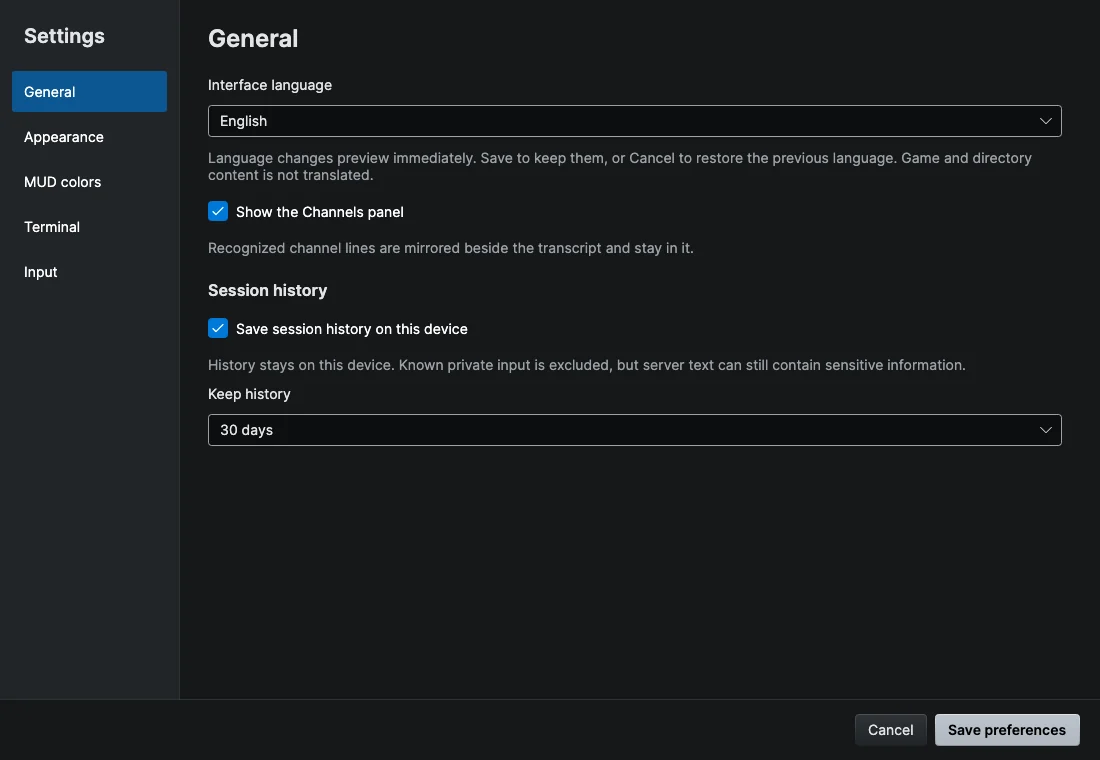
Open Settings (Wandur > Preferences… on macOS, Edit > Preferences… on Windows and Linux) and go to General. Under Session history:
- Save session history on this device turns recording on or off. Turning it off stops new recording but keeps what is already saved.
- Keep history sets how long entries are kept: 30 days, 90 days, 1 year or Forever.
Changes take effect when you choose Save preferences. When you shorten Keep history, older entries are removed. Forever has no size limit, so long, busy sessions can take up a lot of space over time.
Deleting history
To delete one session:
- Open View > Session history and select the session in the Sessions tab, or select one of its search results.
- Choose Delete session and confirm.
This removes the session's lines and its search entries, and it cannot be undone. There is no single button that deletes all history at once; shortening Keep history is the quickest way to clear older sessions. Deleting removes the data from the database, but it is not a secure wipe of your disk or of any backups.
Where history is stored
History lives in the client's database file, wandur.db, in the client's data folder on your computer, together with your saved worlds, maps and scripts. It is never uploaded. The troubleshooting page lists the folder for each system.