WMC help
The optional AI agent for MUDs: setup and limits
The client includes an optional agent: a language model that reads what the world sends and chooses commands for one connection, toward a goal you write. It is off unless you configure it and press Play, and it can only send the commands you list. This page covers what it does, how to set it up and the limits it runs under.
Check the world's rules first
Many worlds forbid automated play, bots or unattended characters, and some ban characters for it. Read the rules of each world (usually a help rules or help bots command, or the world's website) before you run the agent there. When the rules say no, do not use it on that world.
What the agent can see and do
When you start it, the agent looks at:
- recent text from the world, with lines the client recognizes as chat channels left out,
- recognized room and vitals data from GMCP (
Room.Info,Char.Vitals) and room data from MSDP, when the world sends them, - the instructions, goal and list of allowed commands you wrote,
- its own short working notes from earlier steps.
It never sees anything typed with Private Input, your saved passwords, or the automatic login exchange.
Each step, it asks the model for one decision: one of your allowed commands, wait, or done. The client checks that the answer is a command on your list, sends it, then waits for the world to answer before the next step. The model cannot type free text, add arguments, run scripts or chain commands.
Which model servers it works with
The agent talks to a model server over HTTP. Under Provider / API format there are two choices:
| Choice | What it connects to |
|---|---|
| LM Studio (native API) | LM Studio's own API. The client adds /api/v1 to the address. |
| OpenAI-compatible | Any server that offers the OpenAI-style chat completions API. The client adds /v1 to the address. |
You can run a model on your own computer or on another machine you choose. If the server is not on your computer, the text the agent sees from the world is sent to that server. Use a local server if you want it to stay on your machine.
Setting it up
- Start your model server and load a model. In LM Studio, start its local server.
- Right-click the saved world, choose Edit…, and pick Agent settings in the section list.
- Enter the Server address, for example
127.0.0.1:1234, and choose the Provider / API format. - The client looks for models on its own. Choose one from Available models, or type a Model ID (editable).
- If your server needs a key, enter it under Optional API key. It is stored in your system's credential store (macOS Keychain, Windows Credential Manager or the Linux Secret Service), not in the client's database.
- Edit Instructions to describe how the agent should behave in this world.
- Under Goals, choose Add goal or Add template… (Observe surroundings, Explore carefully or Review inventory). Each goal has a name, a description and rules, written in Markdown.
- Edit Allowed commands (see below), check Run limits and response format, and choose Save world.
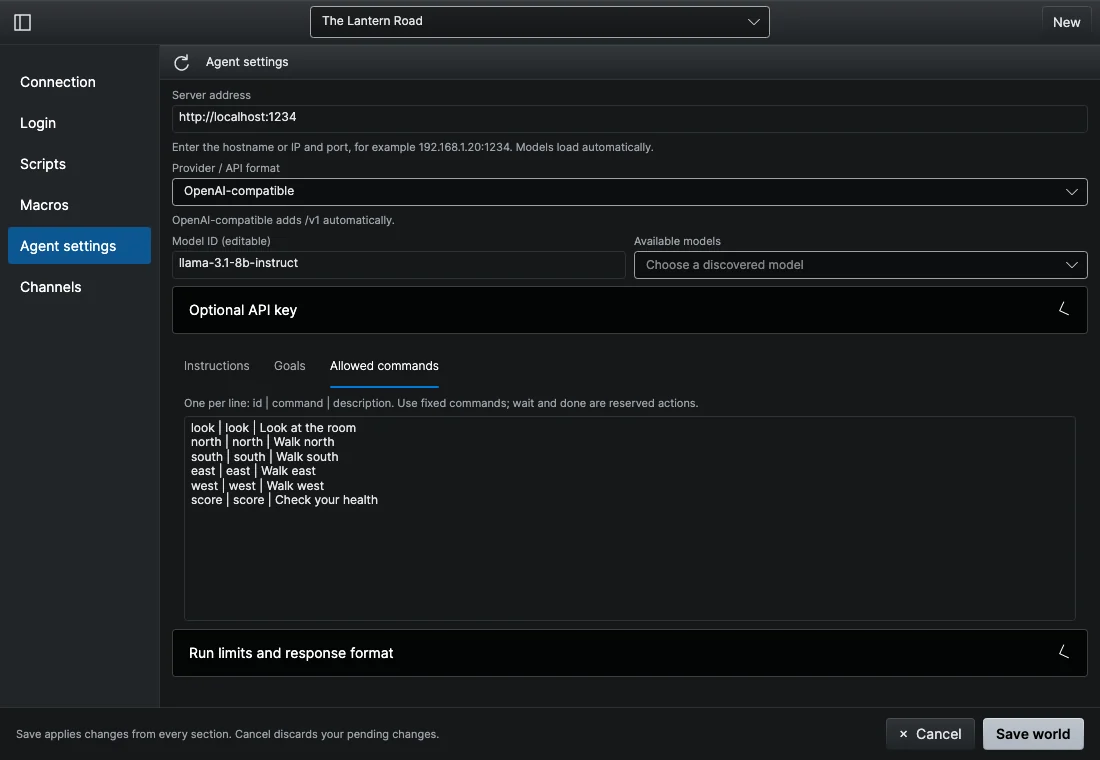
Allowed commands
Write one command per line as id | command | description:
look | look | Examine the current room
north | north | Move north
score | score | Check character status
The first part is a name the model uses, the second is exactly what is sent to the world, and the third tells the model what it does. The starting list has look and the four compass directions. The agent can never send anything that is not on this list, whatever the goal or the model says. Adding a goal template does not add commands.
Running it
- Connect and log in as usual. The agent cannot start until login has finished.
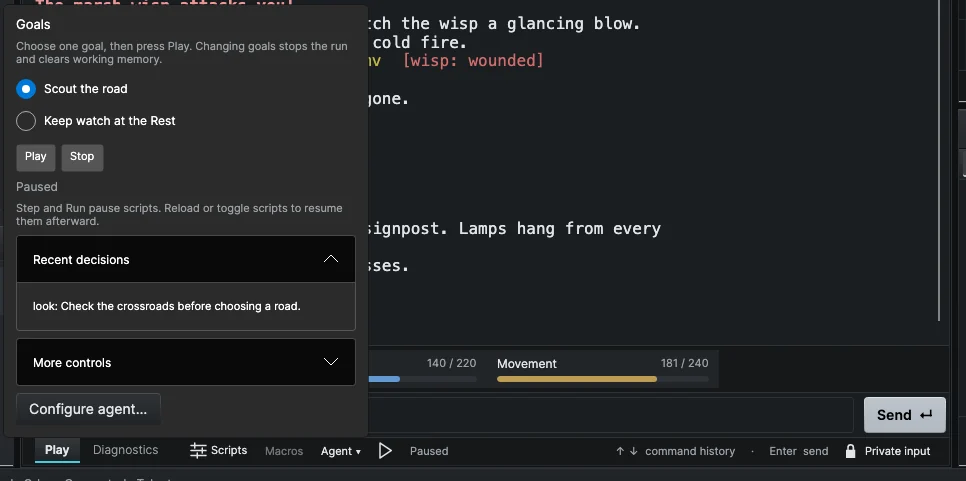
- In the session footer, open Agent ▾ and select one goal for this connection.
- Press Play. Press Stop at any time.
Under More controls, Preview shows the decision the model would make without sending it, Step sends at most one command, and Clear memory wipes the agent's working notes. Each decision and its reason appear under Recent decisions.
Limits it runs under
These are set per world under Run limits and response format:
| Setting | Default |
|---|---|
| Maximum decisions | 30 per run |
| Maximum run (seconds) | 600 (10 minutes) |
| Action interval (seconds) | 2 between commands |
| Response timeout (seconds) | 120 for the model to answer |
| Maximum input characters | 12,000 sent to the model per step |
| Maximum output tokens | 512 |
The run also stops when the model answers done, when the world sends nothing new after a command, or when the model returns an answer the client cannot accept.
The agent stops or pauses whenever you take over:
- turning on Private Input, or a password prompt,
- typing a command yourself, or walking on the map,
- disconnecting, changing the goal, or saving the agent settings.
A run never starts on its own and is not resumed after you restart the client. While the agent runs with Play or Step, your scripts are paused; turn them back on from the Scripts menu afterward. A command already sent to the world cannot be taken back.
Good to know
- The goal's rules are instructions to the model, not rules the client enforces. Only the allowed commands and the run limits are enforced.
- The working notes are short (up to 2,048 characters). They belong to that connection only, and Clear memory or choosing another goal clears them. They are not a saved character memory.
- Small local models can be slow; raise Response timeout (seconds) if requests time out.